Advanced Search
Overview
Advanced Search allows performing precise queries across the database of records. This feature enables the combination of multiple fields and logical operators to refine search results beyond the capabilities of standard search.
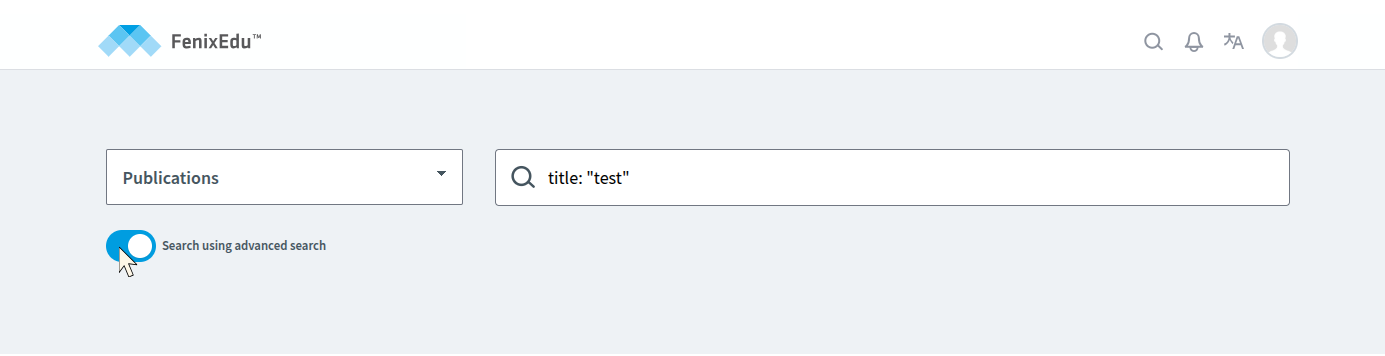
The Advanced Search interface is accessed through the "Search using advanced search" option. Queries must adhere to the defined syntax and use the supported fields and logical operators, which are described in detail in this documentation.
Syntax
An Advanced Search query consists of one or more fielded search expressions, which may be combined using Boolean operators. Each expression has the general form:
field: ([-|+]value [[-|+]value2 ...]) [COMPARATOR field: value ...]Where:
field:— The name of the field to query (for example,title,author,language,date).value— A search term or phrase to match in the field.+/-(optional) — Prefixes indicating that a value is required (+) or excluded (-). The prefix applies only to the value it precedes. Values without a prefix are treated as optional or possible matches.COMPARATOR (optional) — A Boolean operator used to combine multiple field expressions. Supported operators are AND, OR, and NOT:
- AND — Both expressions must match.
- OR — At least one of the expressions must match.
- NOT — The following expression must not match.
When a field contains multiple values:
- Values without a prefix act as possible matches, only one needs to match.
- Parentheses are required around multiple values; without parentheses, the search may not return the expected results.
Examples:
title: (quantum neural)                     # matches titles containing either "quantum" or "neural"
title: (+algorithm -simulation)             # matches titles that must include "algorithm" and must not include "simulation"
title: (+algorithm dataset)                 # "algorithm" is required, "dataset" is optional
title: ((deep AND learning) OR review)      # matches if "deep" and "learning" appear together, or if "review" appears
title: ((quantum OR neural) AND NOT survey) # matches "quantum" or "neural", but excludes any result with "survey"
Values containing spaces must be enclosed in double quotes to form an exact phrase:
title: "quick brown"Pattern and Wildcard Matching
Some fields support pattern-based matching using wildcard characters. Wildcards make it possible to search using partial values when the full value is not known.
Supported Wildcards
The following wildcard is currently available:
*— Matches zero or more characters
Wildcard matching is not case sensitive. Wildcards may be placed at the beginning, middle, or end of a value.
Example:
title: Quant*Examples of possible matches include titles that contain words such as Quantum, quantity, QUANTA, etc ...
Wildcard Support by Field
Only specific fields support wildcard-based matching. Each such field may also impose additional rules or limitations on how wildcards are interpreted.
Fields That Support Wildcards
title
The title field supports the * wildcard.
Wildcard usage in this field follows these rules:
- Wildcard matching is only applied when the input string (excluding the wildcard) contains more than 2 characters.
- The wildcard may match at most 8 characters in the title value.
Example:
title: "com*"This query matches titles that contain the text com (in any letter case) followed by up to 8 additional characters.
Fields
Below is the list of supported fields available for use in Advanced Search queries. The sections that follow define the supported value types, the fields associated with each type, and their valid values.
Fields with Free Text / Arbitrary Values
titleauthordescriptionpublishercitationConferencePlaceaffiliationsmetadata.idmetadata.externalSources
Fields with Fixed / Enumerated Values
typelanguagesubjectFosrightsrecordStatemetadata.statedateIssued.yeardateIssued.month
Boolean Fields
Date Fields
datedateIssuedAsDatedateAcceptedAsDatedateAvailableAsDatecitationConferenceDateStartAsDatecitationConferenceDateEndAsDatemetadata.createdmetadata.updated
Fields with Free Text / Arbitrary Values
These fields accept arbitrary text values and support full-text search. Queries are not limited to predefined options.
title
Field Description: Title of the document.
Example:
title: "Reduction of order of cluster-type recurrence relations"author
Field Description: Author name(s) of the document.
Example:
author: "Inês Cruz"description
Field Description: Description or abstract of the document.
Example:
description: "Certain nonlinear recurrence relations ..."publisher
Field Description: Publisher of the document.
Example:
publisher: "São Paulo Journal of Mathematical Sciences, 6,n.2"citationConferencePlace
Field Description: Location of the conference where the document was presented.
Example:
citationConferencePlace: "Lisboa"affiliations
Field Description: Affiliation ID associated with the document.
Example:
affiliations: "xRwVof2sWCpFSlJ6A3571"metadata.id
Field Description: Unique identifier of the metadata record.
Example:
metadata.id: "6b6a79e5-152b-4e64-b273-837bedc35664"metadata.externalSources
Field Description: External sources associated with the metadata.
Example:
metadata.externalSources: "external-source-id"Fields with Fixed / Enumerated Values
Fields in this category accept only a predefined set of values. Queries must match one of the allowed options exactly.
type
Field Description: Type of the document, describing the nature of the published content.
Valid Values:
"journal-article""book""master-thesis""doctoral-thesis""book-part""conference-object""report""lecture""patent""other"
Example:
type: "journal-article"language
Field Description: Language of the document.
Valid Values:
"por"— Portuguese"eng"— English"cmn"— Mandarin Chinese"ita"— Italian"deu"— German"mwl"— Mirandese"spa"— Spanish"fra"— French
Example:
language: "eng"subjectFos
Field Description: Field of study or subject classification.
Valid Values:
"empty""mathematics""computer-and-information-sciences""physical-sciences""chemical-sciences""earth-and-related-environmental-sciences""biological-sciences""other-natural-sciences""civil-engineering""electrical-engineering-electronic-engineering-information-engineering""mechanical-engineering""chemical-engineering""materials-engineering""medical-engineering""environmental-engineering""environmental-biotechnology""industrial-biotechnology""nano-technology""other-engineering-and-technologies""basic-medicine""clinical-medicine""health-sciences""health-biotechnology""other-medical-sciences""agriculture-forestry-and-fisheries""animal-and-dairy-science""veterinary-science""agricultural-biotechnology""other-agricultural-sciences""psychology""economics-and-business""educational-sciences""sociology""law""political-science""social-and-economic-geography""media-and-communications""other-social-sciences""history-and-archaeology""languages-and-literature""philosophy-ethics-and-religion""arts-history-of-arts-performing-arts-music""other-humanities"
Example:
subjectFos: "computer-and-information-sciences"rights
Field Description: Access rights of the document.
Valid Values:
"open-access""embargoed-access""restricted-access""metadata-only-access"
Example:
rights: "open-access"recordState
Field Description: Current state of the record.
Valid Values:
"draft""publish"
Example:
recordState: "draft"metadata.state
Field Description: Current state of the metadata record.
Valid Values:
"valid""invalid"
Example:
metadata.state: "valid"dateIssued.year
Field Description: Year component of the document issue date.
Valid Values: A four-digit year expressed as a numeric value.
Example:
dateIssued.year: 2012dateIssued.month
Field Description: Month component of the document issue date.
Valid Values: A numeric value representing the month of the year (1–12).
Example:
dateIssued.month: 9Boolean Fields
Fields in this category represent true/false values. They are used to indicate binary attributes of a document.
hasFiles
Field Description: Indicates whether the document has associated files. Accepts only Boolean values: true or false. Queries must match exactly.
Example:
hasFiles: trueisOpenAccess
Field Description: Indicates whether the document is open access. Accepts only Boolean values: true or false. Queries must match exactly.
Example:
isOpenAccess: falseDate Fields
Fields in this category represent full dates or timestamps. Values must be provided in ISO 8601 format. All supported query formats and examples are shown below.
Exact date match
2012-08-31Exact timestamp match
2012-08-31T23:00:00ZClosed date range
[2012-01-01 TO 2012-12-31]Open-ended range (from a date forward)
[2012-01-01 TO *]Open-ended range (up to a date)
[* TO 2012-12-31]Single-day range (equivalent to an exact date)
[2012-08-31 TO 2012-08-31]Timestamp range
[2022-01-01T00:00:00Z TO 2022-12-31T23:59:59Z]
date
Field Description: Primary date associated with the document. Maintained as an alias for dateIssuedAsDate.
Example (range query):
date: [2012-01-01 TO 2012-12-31]dateIssuedAsDate
Field Description: Date when the document was issued.
Example (exact date):
dateIssuedAsDate: 2012-08-31dateAcceptedAsDate
Field Description: Date when the document was accepted.
Example (open-ended range):
dateAcceptedAsDate: [2010-01-01 TO *]dateAvailableAsDate
Field Description: Date when the document became publicly available.
Example (bounded range):
dateAvailableAsDate: [2015-01-01 TO 2018-12-31]citationConferenceDateStartAsDate
Field Description: Start date of the conference associated with the document.
Example (exact date):
citationConferenceDateStartAsDate: 2012-09-01citationConferenceDateEndAsDate
Field Description: End date of the conference associated with the document.
Example (exact date):
citationConferenceDateEndAsDate: 2012-09-30metadata.created
Field Description: Date and time when the metadata record was created.
Example (exact timestamp):
metadata.created: 2023-06-15T14:30:00Zmetadata.updated
Field Description: Date and time when the metadata record was last updated.
Example (exact timestamp):
metadata.updated: 2024-01-05T09:45:00Z